Code Generation
The DaCe code generator traverses an SDFG and generates matching code for the different supported platforms. It also contains components that interact with compilers (via CMake) and invoke the compiled dynamic library (.so/.dll/.dylib file) directly from Python.
How it Works
Given the low-level nature of the SDFG IR, the code generator simply recursively traverses the graph and emits code for each part. This is shown in the animation below:
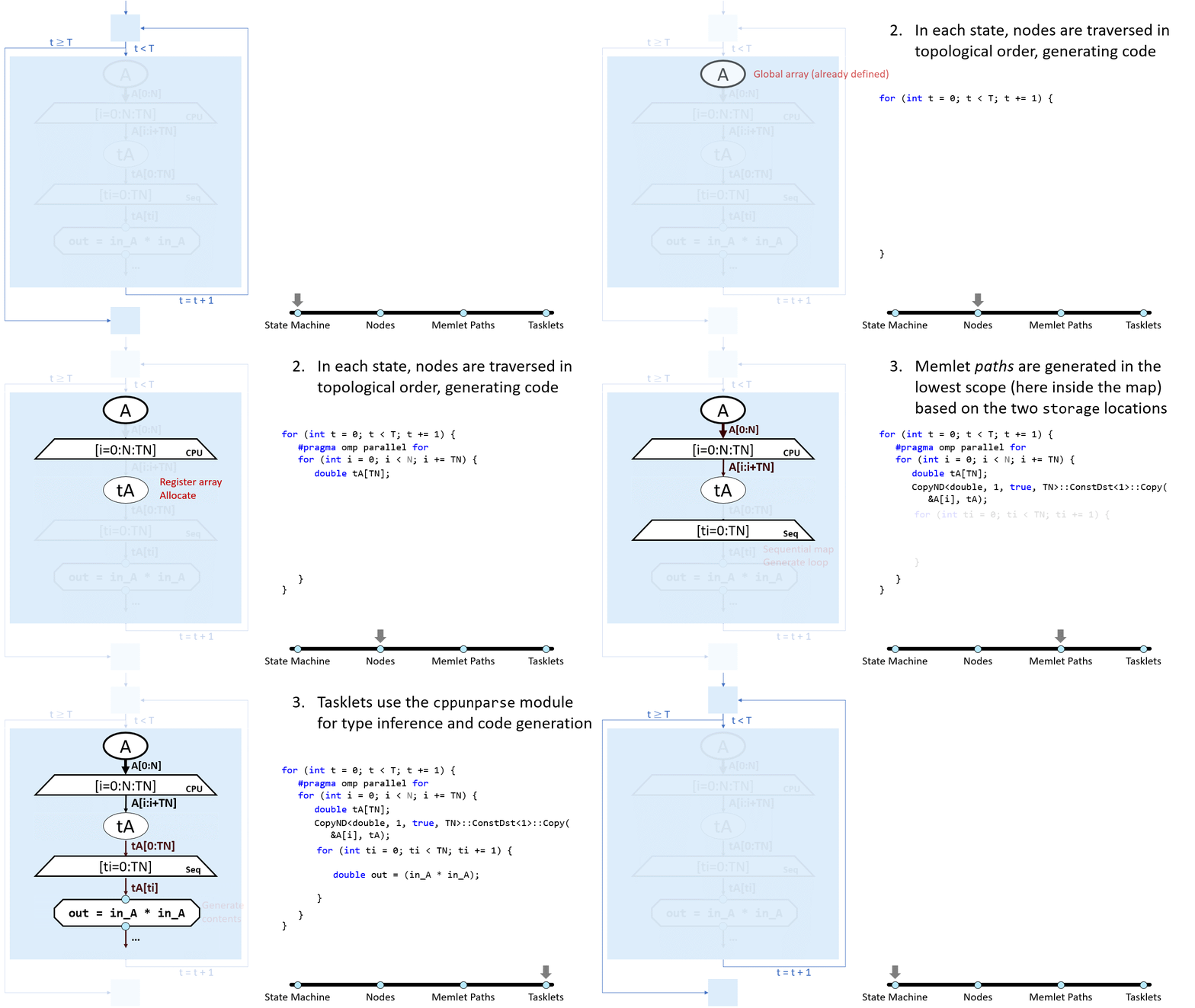
The main code (called “frame code”) is generated in C with externally-callable functions (see C/C++ and C ABI-Compatible Languages). The rest of the backends may use different languages (CUDA, SystemVerilog, OpenCL for FPGA, etc.).
The process starts with inspecting the SDFG to find out which targets are necessary. Then, each target can preprocess the graph for its own analysis (which we assume will not be modified during generation).
After that, the control-flow graph is converted to structured control flow constructs in C (i.e., for/while/if/switch etc.). Then, the frame code generator (targets/framecode.py) dispatches the backends as necessary.
There are many features that are enabled by generating code from SDFGs:
Allocation management can be handled based on
AllocationLifetimeDefined variables can be tracked with types
Concurrency is represented by, e.g., OpenMP parallel sections or GPU streams
Note
You can also extend the code generator with new backends externally, see the Customizing Code Generation tutorial and the Tensor Core sample for more information.
After the code is generated, compiler.py will invoke CMake on the build folder (e.g., .dacecache/<program>/build)
with the CMake file in dace/codegen/CMakelists.txt. This will generate a Makefile or Visual Studio solution,
which is then built by the compiler Python interface. The resulting dynamic library is then loaded into a CompiledSDFG
object, which calls the three C functions initialize (on init), program (every SDFG invocation), and finalize
(on destruction).
File Structure
The files in dace/codegen are organized into several categories:
The
targetsfolder contains target-specific backends
codegen.pycontrols the code generation API and process, withcodeobject.py, common.py, dispatcher.py, exceptions.pyand thetoolssubfolder as helpers
prettycode.pyprints nicely indented C/C++ code
control_flow.pycontains control flow analysis to recover structured control flow (e.g., for loops, if conditions) from SDFG state machines
cppunparse.pytakes (limited) Python codes and outputs matching C++ codes. This is used in Tasklets and inter-state edgesThe
instrumentationfolder contains implementations of SDFG instrumentation providers
compiler.pyandCMakeLists.txtcontain all the utilities necessary to interoperate with the CMake compiler
compiled_sdfg.pycontains interfaces to invoke a compiled SDFG dynamic library
dace/runtimecontains the C++ Runtime Headers
Class Structure and Detailed Process
generate_code() is the entry point to code generation. It takes an SDFG and returns a
list of CodeObject objects, referring to each generated file.
This function then invokes several preprocessing analysis passes, such as concretizing default storage and schedule types into their actual value based on their context (e.g., a scalar inside a GPU kernel will become a register), and expanding all remaining library nodes.
The next step is to create the frame-code generator via the DaCeCodeGenerator,
which will later traverse the graph and invoke the other targets. The targets are found by traversing the SDFG,
followed by each one preprocessing the SDFG for metadata collection as necessary. The frame-code generator then
calls its own generate_code() method, which will generate the headers, footers, and frame, as well as dispatch the other targets.
To generate compiler (and user) friendly code, the state machine of the SDFG is first converted into a structured control-flow
tree by calling structured_control_flow_tree().
This tree is then traversed by the frame-code generator to create for loops, if conditions, and switch statements,
among others.
Within the control flow tree, each state is visited by the frame-code generator, which will then dispatch the other targets
using the TargetDispatcher class. Code generator targets register themselves
with the dispatcher by extending the TargetCodeGenerator class, and then
the dispatcher via the register_*_dispatcher methods (e.g., register_node_dispatcher())
in their constructor. The dispatcher will then call the given predicate function to determine whether the target
should be invoked for the given node. For example, an excerpt from the GPU code generator is shown below:
@registry.autoregister_params(name='cuda')
class CUDACodeGen(TargetCodeGenerator):
    """ GPU (CUDA/HIP) code generator. """
    target_name = 'cuda'
    title = 'CUDA'

    def __init__(self, frame_codegen: DaCeCodeGenerator, sdfg: SDFG):
        # ...
        self.dispatcher = frame_codegen.dispatcher
        self.dispatcher.register_map_dispatcher(dtypes.GPU_SCHEDULES, self)
        self.dispatcher.register_node_dispatcher(self, self.node_dispatch_predicate)
        self.dispatcher.register_state_dispatcher(self, self.state_dispatch_predicate)

    def node_dispatch_predicate(self, sdfg: SDFG, state: SDFGState, node: nodes.Node):
        ...
The dispatcher will then invoke its dispatch_* methods (e.g., dispatch_node())
to invoke the target. Those will then call the generate_* methods (e.g., generate_node()).
On most targets, each node type has a matching _generate_<class> method, similarly to AST visitors, which are
responsible for that node type. For example, see _generate_MapEntry() in
CPUCodeGen.
In the generation methods, there are several arguments that are passed to the target, for locating the element (i.e.,
SDFG, state, node), and handles to two or more CodeIOStream objects, which are used to write
the code itself (it is common to have a callsite_stream that point to the current place in the file, and a global_stream
for global declarations). At this point, instrumentation providers are also invoked to insert profiling code, if set. The
exact methods that are invoked can be found in InstrumentationProvider.
After the graph is traversed, each target is invoked with two methods:
get_generated_codeobjects() and cmake_options()
to retrieve any extra CodeObject files and CMake options, respectively.
The frame-code generator will then merge all code objects and return them, along with any environments/libraries that
were requested by the code generators (e.g., link with CUBLAS). The compiler interface then generates the .dacecache
folders in generate_program_folder() and invokes the CMake compiler in configure_and_compile().
C++ Runtime Headers
The code generator uses a thin C++ runtime for support. The folder, which contains header files written for the different platforms, can
be found in the dace/runtime folder. The dace.h header file is the point of entry for the runtime, and it includes all the other
necessary headers. The runtime is used for:
Target-specific runtime functions: Header files inside the
cudafolder contains GPU (CUDA/HIP) specific functions.Memory management
Profiling:
perf/reporting.hcontains functions that create instrumentation reports,perf/papi.hcontains functions that use the PAPI library to measure performance counters.Serialization: Data instrumentation is provided by
serialization.h, which can be used to serialize and deserialize versioned data containers (e.g., arrays) to and from files.Data movement: copying, packing/unpacking, atomic operations and others are supported by
{copy, reduction}.hand target-specific files such ascuda/copy.cuhInteroperability with Python:
{complex, intset, math, os, pi, pyinterop}.hand others provide functions that match Python interfaces. This is especially useful to generate matching code when calling functions such asrangeinside Tasklets.
The folder also contains other files and helper functions, refer to its contents on GitHub for more information.
Debugging Code Generation
Note
Read Debugging and Recompiling Generated Code first to understand how to recompile SDFGs.
If the code generator fails to generate code for a given SDFG, it will raise an exception. Along with the exception message,
the failing pre-processed SDFG will be saved to _dacegraphs/failing.sdfg. This file can first be inspected for structural
issues.
The code generator itself can be debugged in different ways. If the code generation process is failing,
the Python debugger would be enough to try and understand what is going on. However, if the code generation process
successfully finishes, but generates erroneous code, we can configure DaCe to generate line information for each line
in the generated code, pointing to the Python file and line where it was generated. This can be done by setting the
compiler.codegen_lineinfo to 1. This will generate a source map in .dacecache/<program>/map_codegen.json
that can be read directly, or used automatically in the Visual Studio Code extension to jump directly to the
originating line.
Once the offending line is known, it can be tricky to understand the specific circumstances of the failure. To debug
this efficiently, we can use conditional breakpoints on the code generator with particular hints on the source node.
For example, if we want to debug the code generation of a specific node, we can set a breakpoint in the code generator
and add a condition to it, such as node.label == "my_node". This will stop the code generation process when the
code generator reaches the node with the label my_node. This can be used to debug the code generation of a specific
node, or to debug the code generation of a specific node type (e.g., isinstance(node, dace.nodes.MapEntry)).